React Components Assignment
Instruction In this assignment you will add a new component to the React application to show the details of a selected dish. You will use the Card component and the Bootstrap unstyled list component to prepare the view for this new component.
Assignment Overview In this assignment, you will continue to work with the React application that you have been developing in the exercises. You will add a new component named DishdetailComponent that will display the details of a selected dish. You will then design the view for the component using the card component. At the end of this assignment, you should have completed the following tasks:
- Created a new DishdetailComponent and added it to your React application.
- Updated the view of the DishdetailComponent to display the details of the selected dish using an reactstrap card component.
- Updated the view of the DishdetailComponent to display the list of comments about the dish using the Bootstrap unstyled list component.
Assignment Requirements
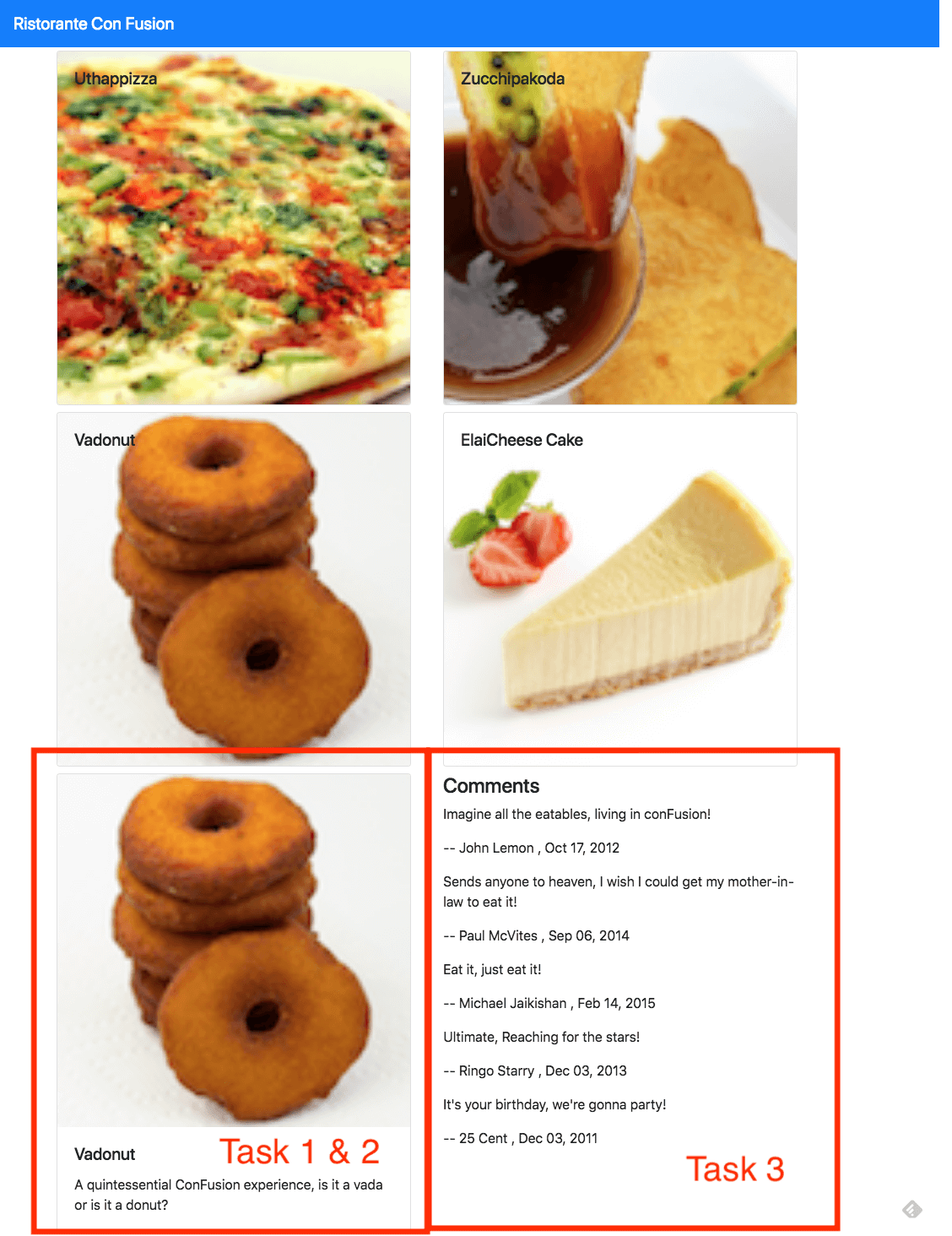
This assignment requires you to complete the following tasks. Detailed instructions for each task are given below. The picture of the completed web page included below indicates the location within the web page that will be updated by the three tasks.
Task 1
In this task you will be adding a new DishdetailComponent to your React application and include the component into the menu component's view so that the details of a specific dish are displayed there:
- Replace the card showing the selected dish in MenuComponent's view with the DishdetailComponent, and make sure to pass the selected dish information as props to the DishdetailComponent.
- Create a new DishDetail class in a file named DishdetailComponent.js in the components folder
- Export the DishDetail class from this file so that it can be imported in MenuComponent.js and used to construct the view of the selected dish.
- Return a <div> from the render() function. This <div> should use the Bootstrap row class to position the content within the <div>. This div will display both the details of the dish in a Card and the list of comments side-by-side for medium to extra large screens, but will stack them for xs and sm screens.
- The card should be enclosed inside a <div> appropriate Bootstrap column classes so that it occupies the entire 12 columns for the xs and sm screen sizes, and 5 columns for md screens and above. Also apply a class of m-1 to this div.
- The comments should be enclosed in a <div> to which you apply appropriate column classes so that it occupies the entire 12 columns for the xs and sm screen sizes, and 5 columns for md screens and above. Also apply a class of m-1 to this div.
- If the dish is null then you should return an empty <div>
Task 2 In this task you will be adding a card component to the DishdetailComponent view to display the details of the dish given above:
- Implement a function named renderDish() that takes the dish as a parameter and returns the JSX code for laying out the details of the dish in a reactstrap Card. You have already seen this as part of the MenuComponent class in the exercise earlier.
- Display the name of the dish as the Card title, and the description as the Card text.
Task 3 In this task you will use the comments that are included in the dish object above to display a list of the comments for the dish. Please use your JavaScript knowledge to recall how you would access an inner property in a JavaScript object that itself points to an array of JavaScript objects (comments). This task involves the following steps:
- Implement a function named renderComments() that takes the comments array as a parameter and lays out each comment as shown in the image below. You should use the Bootstrap list-unstyled class on the list.
- Each comment should be displayed on two lines, the first one showing the comment, and the second line showing the comment author's name and the date.
- The comments should contain a <h4>header with the word "Comments".
- Remember to enclose the header and comments inside a <div> before returning the JSX code. Otherwise React will not do the layout correctly.
- If the comments are null, then you should return an empty <div>.